
The Transmission Control Protocol, or TCP, plays a crucial role in ensuring data gets delivered reliably across networks. It sets up a connection between devices before sending information and waits for confirmations to make sure everything arrives correctly. This approach helps prevent lost or out-of-order packets, making it ideal for applications like web browsing or file transfers. Unlike simpler protocols, TCP adds a layer of checks to handle errors and manage traffic flow.
To understand how TCP works, it’s helpful to look at its header, which is like a control panel attached to each data segment. The header carries instructions on how to process the information. Here’s a visual breakdown of the typical TCP header layout.

Breaking Down the TCP Header Fields
The TCP header is usually 20 bytes long but can extend with extra options. Each field has a specific job in managing the connection, tracking data, and controlling flow. Let’s go through them one by one.
- Source Port (16 bits): This identifies the application or service on the sending device that’s originating the data. Ports range from 0 to 65535, with well-known ones like 80 for HTTP used for standard services.
- Destination Port (16 bits): Similar to the source, this points to the receiving application’s port on the other end. It helps the destination device route the incoming data to the right program.
- Sequence Number (32 bits): TCP assigns a unique number to each byte of data to keep track of order. The starting value is chosen randomly for security reasons. As data is sent, this number increases by the amount of bytes transmitted, allowing the receiver to reassemble everything in the correct sequence.
- Acknowledgment Number (32 bits): When receiving data, the device uses this to confirm what it’s gotten so far. It sets this to the next sequence number it expects, signaling that all prior bytes are received. This field is only active if a certain flag is set.
- Data Offset (4 bits): This tells how long the header is in 32-bit words. Since the basic header is 20 bytes (5 words), this starts at 5 but increases if options are added.
- Reserved (6 bits): These bits are set aside for potential future features and are usually zero.
- Flags (6 bits): These are control switches that manage the connection’s state. Each is a single bit:
- URG: Indicates urgent data that needs immediate attention, bypassing normal queues.
- ACK: Confirms that the acknowledgment number is valid, used in most packets after setup.
- PSH: Tells the receiver to push the data to the application right away, without buffering.
- RST: Forces a connection reset, often due to errors or unexpected behavior.
- SYN: Starts a connection by synchronizing sequence numbers between devices.
- FIN: Signals the end of data from the sender, helping to close the connection gracefully.
- Window (16 bits): This shows how much buffer space the receiver has left for incoming data. It helps the sender know how much to transmit without overwhelming the other side, acting as a flow control tool.
- Checksum (16 bits): A calculation over the header and data to detect errors during transmission. The receiver recomputes it and discards the packet if it doesn’t match.
- Urgent Pointer (16 bits): If the URG flag is on, this points to the end of the urgent data within the segment.
- Options (variable): Extra settings that can extend the header up to 40 bytes. Common ones include maximum segment size or timestamps for better performance.
TCP Window Size Scaling
The window field is key for managing data flow, but its 16-bit size limits it to 65,535 bytes. To handle faster networks, TCP uses an option called window scaling during connection setup. This adds a shift value (0 to 14) that multiplies the window size, effectively expanding it up to about 1 gigabyte.
For example, a shift of 7 means the advertised window is multiplied by 128. This allows devices with large buffers to accept more data at once, improving throughput on high-speed links.
How Window Size Works in Practice
When a connection starts, the sender transmits a small amount of data and waits for an acknowledgment. The receiver replies with its current window size, indicating available buffer space. If everything goes smoothly, the window can grow, allowing more segments to be sent before waiting.
This process is called windowing. Initially, it might allow just one segment, then two, then four, doubling each time with successful deliveries. But if no acknowledgment comes within the round-trip time, the sender retransmits and reduces the window.
Congestion Control with Slow Start
Networks can get busy, leading to dropped packets when router queues fill up. TCP’s slow start algorithm helps by starting with a small congestion window (often one segment) and doubling it for each acknowledged round. This exponential growth probes the network’s capacity.
If a packet is lost (detected by timeout or duplicate acknowledgments), the window halves, and slow start restarts up to that threshold before switching to linear growth (adding one segment per round). This balances speed and reliability.
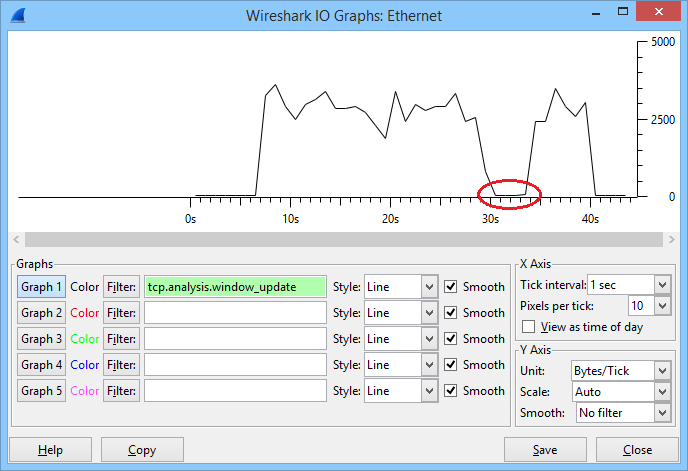
Here’s a graph illustrating how the window size changes over time during a transfer, showing growth and drops.
Avoiding Global Synchronization
When multiple TCP connections share a link and all detect congestion at once, they might all cut their windows simultaneously, underusing the bandwidth. This is global synchronization.
To prevent it, routers can use Random Early Detection (RED). It drops packets probabilistically as queues build, based on average size and priority markings. This spreads out the drops, keeping flows from syncing up.
See this diagram comparing standard congestion to improved handling with RED.
Wireshark Captures for Real-World Insight
To see the TCP header in action, tools like Wireshark are invaluable. They capture packets and display fields clearly. For instance, during a connection setup, known as the three-way handshake, you can spot the SYN flag in the first packet, SYN-ACK in the response, and ACK in the final one.
Here’s an example capture of a three-way handshake.
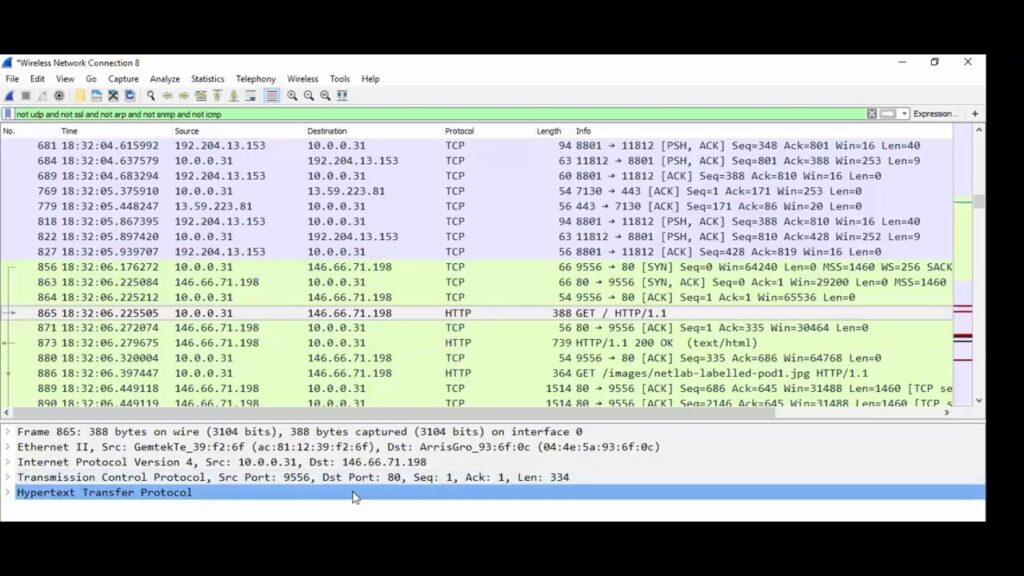
Using Wireshark to capture a 3 way handshake with TCP
In a practical scenario, imagine transferring a file from a powerful computer to a slower device over a fast link. The receiver’s window might start high but drop as its buffer fills. You could see the window reach zero, pausing the sender until space frees up.
Look for relative sequence numbers in Wireshark for easier reading—they start from zero instead of the random initial value.
For basics on transport protocols, check out our guide on TCP and UDP Basics.
To understand how TCP fits into the bigger picture, review the Introduction to the OSI Model.
If you’re curious about IP headers that encapsulate TCP, see Understanding the IPv4 Packet Header.
For address mapping related to TCP connections, explore “Understanding Address Resolution Protocol (ARP)“
Frequently Asked Questions
What is the purpose of the sequence number in the TCP header?
The sequence number tracks the order of data bytes sent in a TCP connection. It starts with a random value and increments by the number of bytes transmitted, helping the receiver reassemble packets correctly and detect any missing parts.
How does TCP window size scaling improve performance?
Window size scaling extends the 16-bit window field by applying a multiplier during the handshake. This allows larger buffer advertisements on high-bandwidth networks, enabling more data to be sent without waiting for acknowledgments and boosting overall throughput.
What happens when the TCP window size reaches zero?
A zero window means the receiver’s buffer is full and can’t accept more data. The sender stops transmitting until it receives an update with a positive window value, preventing overflow and ensuring reliable delivery.
Why is the ACK flag important in TCP packets?
The ACK flag validates the acknowledgment number, confirming receipt of prior data. It’s used after the initial setup in most packets to maintain the connection and signal progress in data transfer.
How does slow start help with TCP congestion control?
Slow start begins with a small window and doubles it exponentially with each successful acknowledgment round. This gradually tests network capacity, reducing the risk of overwhelming links and causing drops, then transitions to linear growth for stability.