
When you type a website address into your browser, you rarely think about the numbers behind it. Instead of memorizing strings like 95.85.36.216, you simply enter “netitpro.com” and the page loads instantly. This convenient mapping from human-readable names to machine-readable IP addresses is the job of the Domain Name System, or DNS.
DNS is a core network protocol that translates friendly hostnames into IP addresses so devices can communicate. Without it, the internet would be almost unusable for everyday users. Every time you visit a site, send an email, or connect to an online service, DNS works quietly in the background to make the connection possible. It operates at the application layer of the network stack, building on lower-layer protocols to deliver this essential service.
The system is cleverly designed to be both distributed and hierarchical. No single DNS server on the planet holds a complete list of every hostname and its matching IP address. Instead, responsibility is shared across thousands of servers worldwide. This design prevents any one point of failure and allows the system to scale to billions of requests every day. If one server cannot answer a query, it knows exactly whom to ask next, creating an efficient chain of delegation.
The DNS Hierarchy
DNS organizes all domain information in a tree-like structure that starts at the very top and branches downward. This hierarchy is the key to its efficiency and reliability.
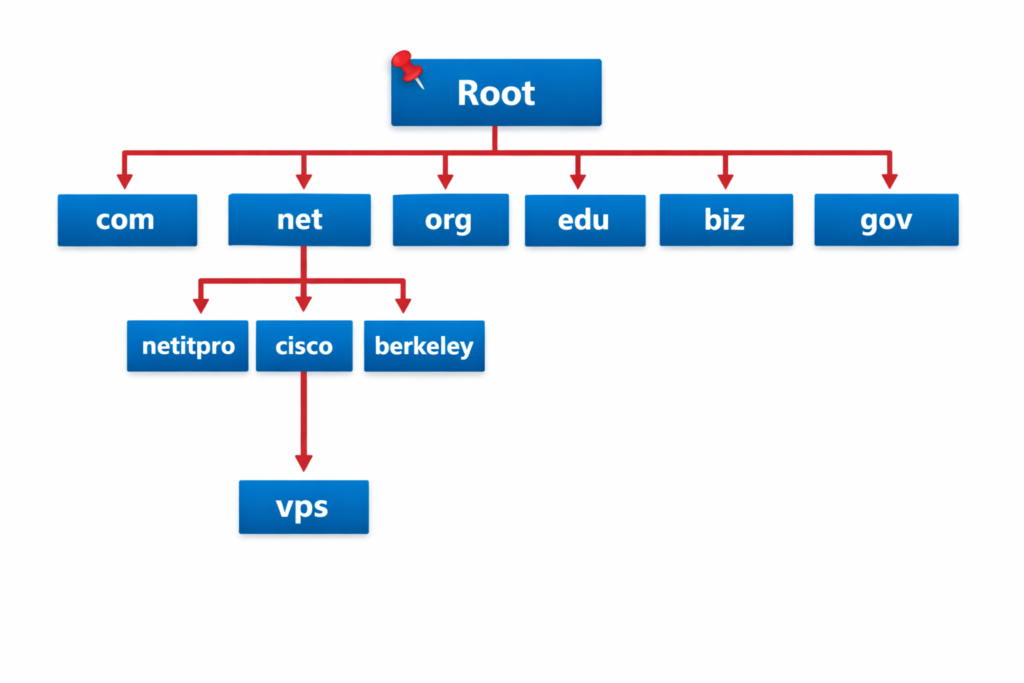
Root Name Servers
At the absolute top of the hierarchy sit the root name servers. There are 13 of them in total. These servers do not store actual website IP addresses. Instead, they hold information about the name servers responsible for each top-level domain extension.
The root servers act as the universal starting point for any DNS lookup that cannot be answered from local cache. When a resolver needs to find an address and has no prior knowledge, it begins its journey here.
These 13 root servers are operated by independent organizations and are distributed globally using anycast technology, ensuring fast responses no matter where the query originates.
Top-Level Domains (TLDs)
Directly below the root are the top-level domains, often called TLDs. You see them every day: .com, .net, .org, .edu, .biz, and country-code extensions such as .pk, .uk, .nl, or .ca.
Each TLD has its own set of authoritative name servers. A .com server, for example, knows everything about domains ending in .com but knows nothing about .org or .pk domains. When it receives a query for something outside its responsibility, it refers the requester to the correct TLD server.
Second-Level Domains
Under each TLD live the second-level domains—the actual names that organizations and individuals register. Examples include netitpro.com, cisco.com, or google.com.
These are the domains you purchase through a registrar. The owner of a second-level domain decides how to use subdomains and hostnames beneath it.
Hostnames and Subdomains
At the lowest level of the hierarchy are hostnames and subdomains.
- vps.netitpro.com → hostname “vps” on the netitpro.com domain
- tools.cisco.com → subdomain “tools” on the cisco.com domain
- mail.example.pk → hostname “mail” on the example.pk domain
You can create as many levels as needed (sub-subdomains), although very deep structures are rare in practice.
Fully Qualified Domain Name (FQDN)
When you write a complete hostname together with its entire domain path, you create a Fully Qualified Domain Name (FQDN).
Examples:
- netitpro.com
- www.cisco.com
- www.example.co.uk
To indicate the absolute path from the hostname all the way to the root, technicians often add a trailing period: vps.netitpro.com.
The trailing dot explicitly marks the root. Most applications accept the name without the dot, but the trailing period is technically the most correct and unambiguous way to specify an FQDN.
Summary of the DNS Hierarchy
The following table captures the complete structure using the earlier example:
| Hierarchy Level | Component | Example |
|---|---|---|
| Root | . | . |
| Top-Level Domain | com | .com |
| Second-Level Domain | netitpro | netitpro.com |
| Hostname | forum | forum.netitpro.com |
This simple table shows how each level adds one more label to the left, separated by dots, until the full address is formed.
How DNS Resolution Works
Now that we understand the structure, let’s see the resolution process in action.
When your computer needs to reach a hostname, the operating system acts as a stub resolver. It sends a DNS query to the DNS server configured in your network settings (usually provided by your ISP or a public resolver like 8.8.8.8).
The DNS server receives the request and checks its cache. If the answer is already there, it replies immediately. If not, it begins the resolution process by contacting a root name server. The root server responds with the address of the appropriate TLD server. The resolver then asks the TLD server, which points to the authoritative name server for the specific domain. Finally, that authoritative server returns the requested IP address.
The entire conversation consists of simple request-and-reply messages. The client sends a query containing the hostname, and the server replies with the matching IP address (or an error if the name does not exist). Once the IP address is obtained, your device can establish a connection using normal IP communication.
This process happens in milliseconds and is completely transparent to the user. Caching at every level dramatically reduces the load on the root and TLD servers, which is why most lookups feel instantaneous.
The hierarchical design ensures that even with billions of domains, the system remains fast and resilient. No single server is overwhelmed, and local resolvers can answer repeated queries from their own cache.
Why This Design Matters for CCNA Students
Understanding DNS at this level is essential for the CCNA 200-301 exam and for real-world networking. Many connectivity problems that appear to be routing or interface issues are actually DNS failures. When a user cannot reach a website but can ping the IP address directly, the issue is almost always DNS-related.
The distributed and hierarchical nature also teaches important lessons about scalability and fault tolerance—concepts that appear throughout the CCNA curriculum in routing protocols, redundancy, and cloud services.
Frequently Asked Questions
DNS is the Domain Name System, a network protocol that translates human-friendly hostnames into IP addresses. We need it because remembering long strings of numbers is impractical, while names like “google.com” are easy to remember and type.
There are 13 root name servers. They do not store website addresses; they only know which name servers are responsible for each top-level domain. They serve as the universal starting point for any DNS lookup that is not already cached.
A top-level domain is the last part of a domain name, such as .com, .net, .org, or country codes like .pk and .uk. Each TLD has its own set of name servers that know the authoritative servers for second-level domains under that extension.
FQDN stands for Fully Qualified Domain Name. It is the complete hostname plus domain path (e.g., vps.netitpro.com). The trailing dot is added to indicate the absolute path from the root and is technically the most precise notation.
A client (stub resolver) sends a query containing the hostname to its configured DNS server. The server either answers from cache or performs the hierarchical lookup and returns the IP address in a reply message. The entire exchange usually takes only a few milliseconds.