
Virtual Local Area Networks, or VLANs, offer a smart way to organize and manage devices in a network without being limited by their physical connections. Imagine having the flexibility to group computers, servers, and other equipment as if they were on separate switches, even when they’re plugged into the same one. This logical separation helps in creating more efficient, secure, and scalable setups, especially in larger environments like offices or campuses.
In traditional networking, the physical layout dictates how devices communicate—cables connect everything directly. But VLANs change that by allowing you to define groups virtually. For instance, you could have employees from different teams sharing the same hardware but operating in isolated segments. This approach not only optimizes performance but also simplifies administration.
To illustrate, consider a typical company network where various departments such as sales, finance, and IT are spread out. Without VLANs, all these groups might be connected through a series of switches linked together, leading to a single, sprawling local area network (LAN). Here’s a visual representation of such a setup:
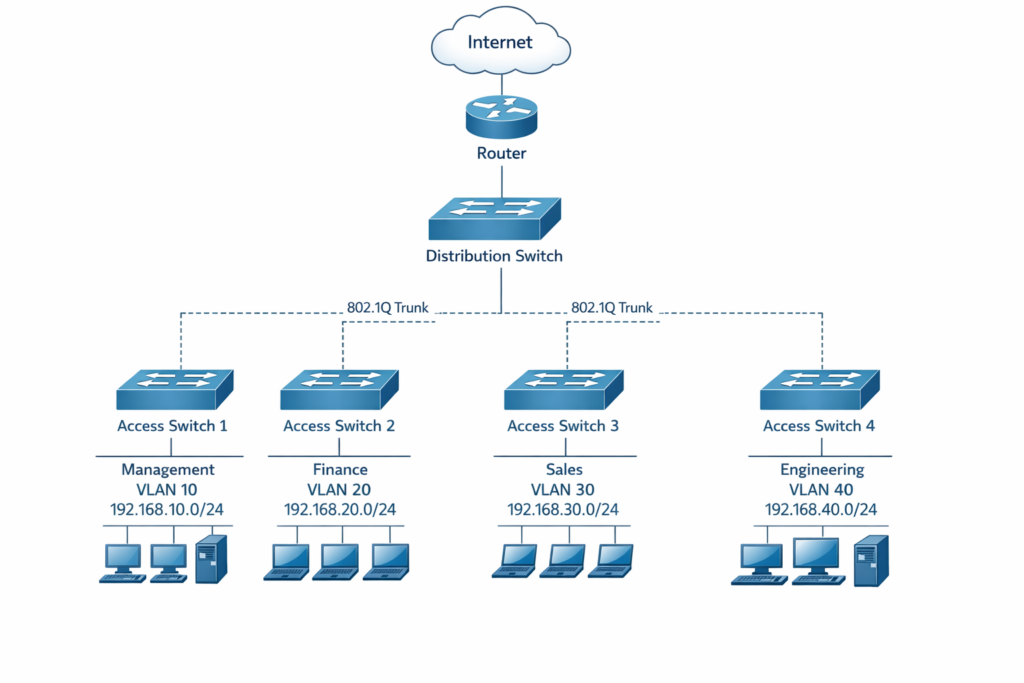
In this diagram, you see multiple switches connected to a central router that provides internet access. Each switch handles a specific department, but since they’re all interconnected at the data link layer—part of the OSI Model —traffic can flow freely between them. At first glance, this seems straightforward, but let’s think about the potential drawbacks.
What happens if a device in the sales department sends out a broadcast message? Switches are designed to forward these broadcasts to all connected ports, except the one it came from, to ensure the message reaches its intended recipient if the destination is unknown. This means the broadcast would flood across all switches in the network, reaching every device in finance, IT, and beyond. Such flooding can consume unnecessary bandwidth and slow down the entire system, especially as the network grows.
Another issue arises with reliability. If one of the switches fails—say, the one for the finance team— that entire department could lose connectivity, while others remain online. But because everything is interconnected, troubleshooting becomes complex, and there’s no built-in redundancy unless you add extra hardware.
Security is perhaps the most critical vulnerability in this flat design. Since all devices are in the same broadcast domain, a malicious user could potentially intercept traffic from other departments. For example, by spoofing a MAC address—the unique identifier for network interfaces—a hacker might gain unauthorized access. Protocols like the one used for mapping IP addresses to MAC addresses, known as Address Resolution Protocol (ARP), rely on broadcasts, which can be exploited in an unsegmented network.
Now, pause for a moment and reflect: In the network shown, how many devices would receive a broadcast sent from a computer in the IT department? Would it stop at the department switch, or propagate further? And what role does the router play in this?
The answer lies in understanding broadcast domains. A broadcast domain is essentially the boundary within which broadcast traffic can travel freely. In our example, switches don’t break these domains; they extend them. So, a broadcast from any device would flood through all switches, reaching every corner of the LAN. However, the router acts as a barrier. Routers operate at a higher layer and don’t forward broadcasts by default, creating a natural separation. Thus, in this setup, there’s typically one large broadcast domain on the LAN side and another on the WAN or internet side.
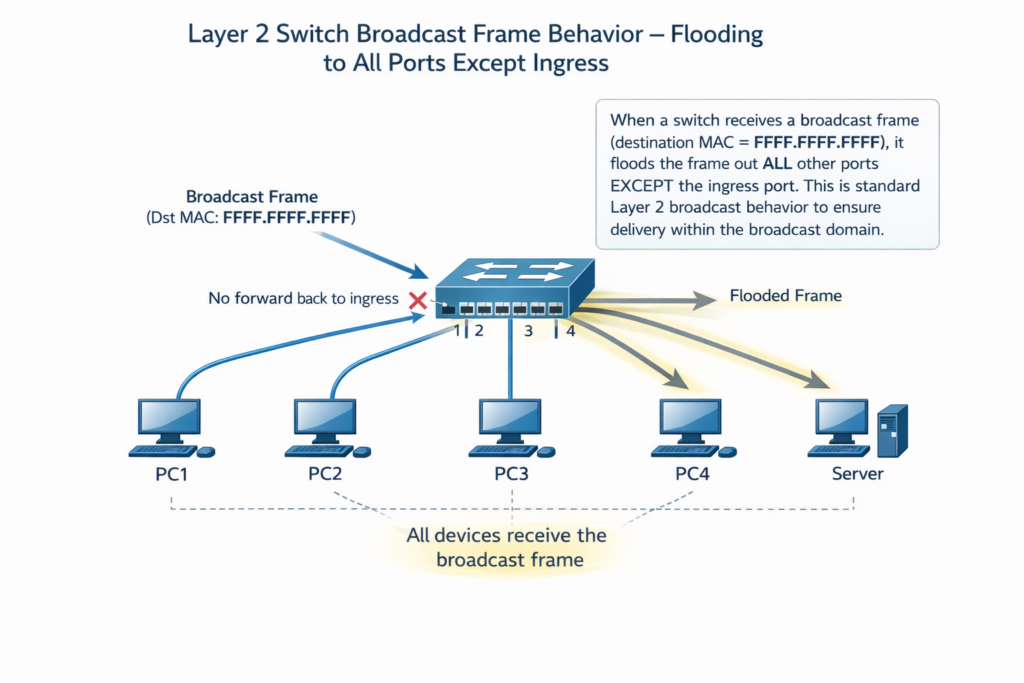
Why does this matter? Excessive broadcasts can degrade performance. Think about everyday network activities: devices discovering each other, resolving addresses, or even simple file sharing can generate broadcasts. In a flat network with hundreds of devices, this chatter adds up, wasting resources and increasing the risk of congestion.
VLANs address these challenges head-on by allowing you to carve up a single physical switch into multiple virtual ones. Each VLAN functions as its own isolated LAN, with its own broadcast domain. Devices in one VLAN can’t directly communicate with those in another without going through a router, which adds a layer of control and security.
For example, you could assign the sales department to VLAN 10, finance to VLAN 20, and IT to VLAN 30, all on the same switch. Broadcasts from sales would stay within VLAN 10, never bothering finance or IT. This segmentation reduces unnecessary traffic, improves efficiency, and makes it harder for threats to spread laterally across the network.
Often, VLANs are paired with IP subnets to align logical groups with addressing schemes. For instance, VLAN 10 might use the 192.168.10.0/24 subnet, while VLAN 20 uses 192.168.20.0/24. This integration ensures that routing between VLANs is handled properly, drawing on concepts from Internet Protocol (IP) Version 4.
Let’s dive a bit deeper into how this works. When a frame enters a switch port assigned to a VLAN, the switch tags it with a VLAN identifier, usually following the IEEE 802.1Q standard. This tag helps the switch decide where to forward the frame—only to ports in the same VLAN. Untagged ports, known as access ports, are for end devices, while trunk ports carry traffic for multiple VLANs between switches.
This virtual partitioning doesn’t require rewiring; it’s all configured in software on the switch. For CCNA students, grasping this is key because it builds the foundation for more advanced topics like inter-VLAN routing and VLAN trunking protocols.
Consider a real-world scenario: A school network with students, teachers, and administrative staff. Without VLANs, a student’s broadcast-heavy application could disrupt the admin servers. By implementing VLANs, you isolate student devices, ensuring smooth operation for critical systems.
Another advantage is scalability. As your organization grows, adding new departments doesn’t mean buying more switches; you simply create new VLANs. This cost-saving aspect is huge for businesses.
Security benefits extend beyond isolation. With VLANs, you can apply policies per group, like restricting guest access to the internet only. If a device gets compromised in one VLAN, the damage is contained, unlike in a flat network where it could pivot to sensitive areas.
Now, think about the broadcast domain question again. In a VLAN-enabled network, each VLAN forms its own broadcast domain. So, if you have three VLANs on one switch, you’d have three separate domains, even though physically it’s one device.
Routers still play a role here. To communicate between VLANs, traffic must pass through a router or a layer 3 switch, which can filter and route based on IP addresses. This inter-VLAN routing ensures controlled access, by using access control lists (ACLs) for added security.
One common misconception is that VLANs eliminate all broadcasts. They don’t; broadcasts still occur within a VLAN, but they’re confined, reducing overall impact. Protocols that rely on broadcasts, like ARP for resolving local addresses, function normally within their domain.
In terms of performance, smaller broadcast domains mean less overhead. Devices process fewer irrelevant frames, leading to faster response times. This is especially noticeable in environments with VoIP phones or video conferencing, where latency matters.
For those studying CCNA 200-301, remember that VLANs are a layer 2 technology. They don’t handle IP addressing directly—that’s where subnets come in—but they complement it perfectly. Understanding this interplay is crucial for exam success.
Let’s revisit our initial network diagram. Without VLANs, it’s one big broadcast domain on the LAN side. With VLANs, you could split it into multiple domains, one per department, all while using the same physical infrastructure.
This flexibility is why VLANs are a staple in modern networking. They allow for logical organization that matches business needs, not just physical constraints.
As you progress in your studies, you’ll learn about configuring VLANs on Cisco devices, but for now, focus on the why: solving the inefficiencies of flat networks.
In summary, VLANs provide logical segmentation, contain broadcasts, boost security, and enhance manageability—all without extra hardware.
Frequently Asked Questions
What is a VLAN in networking?
A VLAN, or Virtual Local Area Network, is a logical subdivision of a physical network that groups devices as if they were on separate switches. It helps in managing traffic efficiently by creating isolated segments within the same hardware.
Why are VLANs used in networks?
VLANs are used to reduce broadcast traffic, improve security by isolating groups, and enhance performance in large networks. They address issues like congestion and single points of failure in flat designs without requiring physical changes.
What is a broadcast domain?
A broadcast domain is the network segment where broadcast messages can propagate freely until blocked by a device like a router. Switches extend these domains, while VLANs create multiple smaller ones to limit traffic spread.
How do VLANs enhance network security?
VLANs enhance security by segregating traffic between groups, preventing unauthorized access across segments. Devices in different VLANs can’t communicate directly, reducing risks from threats like MAC spoofing or broadcast exploits.