
When data travels across networks, it relies on protocols to ensure it reaches its destination properly. At the transport layer, two primary options handle this task: the Transmission Control Protocol (TCP) and the User Datagram Protocol (UDP). These protocols add essential details to IP packets, such as port numbers for directing traffic to specific applications. This guide explores what makes TCP and UDP distinct, when to use each, and their basic operations, tailored for those preparing for the CCNA 200-301 exam.
Essential Distinctions Between TCP and UDP
TCP stands out for its focus on dependability, making sure every piece of data arrives intact and in the right order. In contrast, UDP prioritizes speed and simplicity, delivering data without guarantees, often called a “best-effort” approach. You might wonder why anyone would choose an unreliable method—let’s look at practical situations to clarify.
Imagine downloading a large software update, say 15 GB in size. If a network glitch drops a few packets, TCP steps in by detecting the loss and requesting retransmissions. This prevents the file from becoming unusable due to missing parts. On the other hand, consider a live video call. If TCP were used and packets got lost, the constant retries would cause lags, stutters, and awkward delays. UDP shines here by simply sending data onward; modern video tools can fill in minor gaps, keeping the conversation smooth and real-time.
TCP vs. UDP Comparison
To highlight the contrasts, here’s a straightforward table outlining core features:
| Feature | TCP | UDP |
|---|---|---|
| Connection Style | Requires setup (connection-oriented) | No setup needed (connectionless) |
| Packet Ordering | Yes, via numbering system | No built-in ordering |
| Common Applications | Web browsing, email transfers | Online gaming, media streaming |
In terms of connections, TCP establishes a link through an initial exchange before any data flows, ensuring both ends are ready. UDP jumps straight in, which saves time but risks issues. For ordering, TCP assigns numbers to packets so the receiver can reassemble them correctly. UDP skips this, though some apps layered on top, like those for voice calls, might add their own sequencing.
Exploring the UDP Protocol
UDP keeps things minimal with a compact header that includes just the basics: origin and target ports, a length indicator, and a checksum for basic error detection. This design suits scenarios where overhead must be low.
Key aspects of UDP include its position in the OSI model’s transport layer. It operates without formal connections, allowing immediate data dispatch. Error handling is limited to the checksum, which spots corruption but doesn’t fix it—damaged packets are just dropped. Overall, it’s unreliable, lacking retries or order guarantees, making it ideal for time-sensitive tasks where occasional losses are tolerable.
Diving into the TCP Protocol
TCP builds reliability by initiating a connection before data exchange, using a process known as the three-way handshake. This setup confirms both devices are communicating effectively.
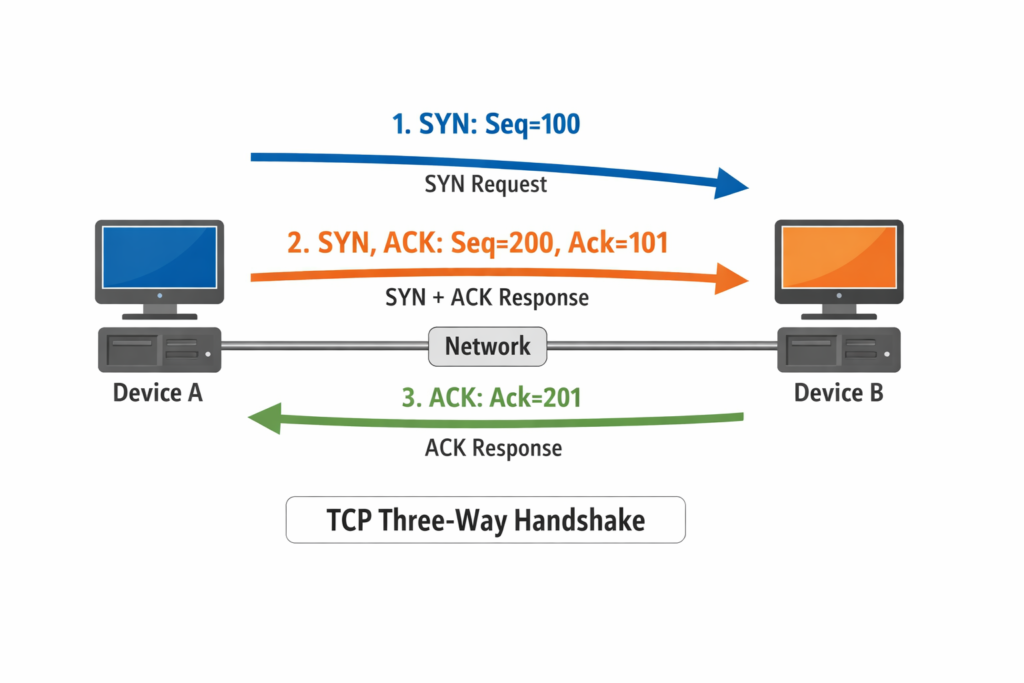
Picture two computers, Device A and Device B. Device A starts by sending a synchronization (SYN) packet with an initial sequence number, say 100. Device B responds with its own SYN packet, acknowledging A’s number (by adding 1, so 101) and providing its sequence number, like 200. Finally, Device A acknowledges B’s number (201) in an acknowledgment (ACK) packet. This back-and-forth establishes a stable channel for data.
Beyond the handshake, TCP manages flow with acknowledgments, retransmits lost segments, and uses windowing to control data volume. Its header is more detailed, incorporating fields for sequence and acknowledgment numbers, flags for control signals, and options for advanced features. This complexity supports applications needing accuracy, like file transfers over IP networks.
TCP’s error recovery involves checking the checksum and sequence to detect issues, then requesting missing parts. It also handles congestion by adjusting send rates, preventing network overloads. In essence, TCP transforms the underlying IP’s unreliability into a trustworthy service.
TCP Header Breakdown
The TCP header spans 20 bytes minimum, expandable with options. Key fields include:
- Source and Destination Ports: Identify the sending and receiving applications.
- Sequence Number: Tracks the order of data bytes.
- Acknowledgment Number: Confirms receipt up to a certain point.
- Data Offset: Indicates header length.
- Flags: Bits for SYN, ACK, FIN (finish), and others to manage connection states.
- Window Size: Tells how much data the receiver can handle.
- Checksum: Verifies integrity.
- Urgent Pointer: Highlights priority data, though rarely used.
This structure enables TCP’s robust features, contrasting UDP’s simplicity.
UDP Header Breakdown
UDP’s header is just 8 bytes, keeping it lightweight:
- Source Port: Optional, for replies.
- Destination Port: Directs to the correct app.
- Length: Total size of header plus data.
- Checksum: Optional error check covering header, data, and pseudo-header from IP.
No sequencing or flow control here, emphasizing efficiency.
Real-World Examples of TCP and UDP in Action
For TCP, think of loading a webpage: Your browser uses TCP to fetch HTML, images, and scripts reliably, reassembling everything perfectly. If a packet drops due to Wi-Fi interference, it’s resent without you noticing.
UDP examples include DNS queries for quick domain lookups—losses are rare, and retries can happen at higher levels. Or streaming services: Video packets arrive via UDP; codecs interpolate missing frames to avoid buffering.
These protocols often work with IP headers, where ports help multiplex multiple connections over one IP address.
When to Choose TCP or UDP
Select TCP for accuracy-critical tasks like database updates or secure logins. Opt for UDP in latency-sensitive environments, such as multiplayer games where a split-second delay matters more than perfect data.
Remember, neither handles addressing—that’s IP’s job. For resolving IP to MAC, protocols like ARP come in, want learn more about ARP visit our article on understanding Address Resolution Protocol.
Frequently Asked Questions
TCP provides reliable, ordered delivery with connection setup and error correction, ideal for file transfers. UDP offers faster, connectionless transmission without guarantees, suiting real-time apps like video calls. Both use ports but differ in overhead and use cases.
It begins with a SYN packet from the initiator, followed by a SYN-ACK from the responder, and ends with an ACK from the initiator. This establishes sequence numbers and confirms bidirectional communication. It’s essential for TCP’s reliability.
The UDP header includes source port, destination port, length, and checksum. It’s only 8 bytes, making it efficient for simple data delivery. The checksum helps detect errors but doesn’t trigger retransmissions.
UDP doesn’t acknowledge receipts, order packets, or retransmit losses—it’s best-effort only. This reduces delay but risks data issues. Applications handle any needed recovery themselves.
Both function at the transport layer of the OSI model. They add port information to IP packets from the network layer, enabling application-specific routing. This separation allows multiple services over one connection.