
802.1Q is the IEEE standard that allows switches to carry traffic from multiple VLANs across a single physical link. This is done by adding a small tag to Ethernet frames. The process is called 802.1Q encapsulation or VLAN tagging.
Without tagging, a switch would have no way to separate traffic from different VLANs when sending it over a shared cable. Tagging solves that problem cleanly and efficiently.
802.1Q Frame Format
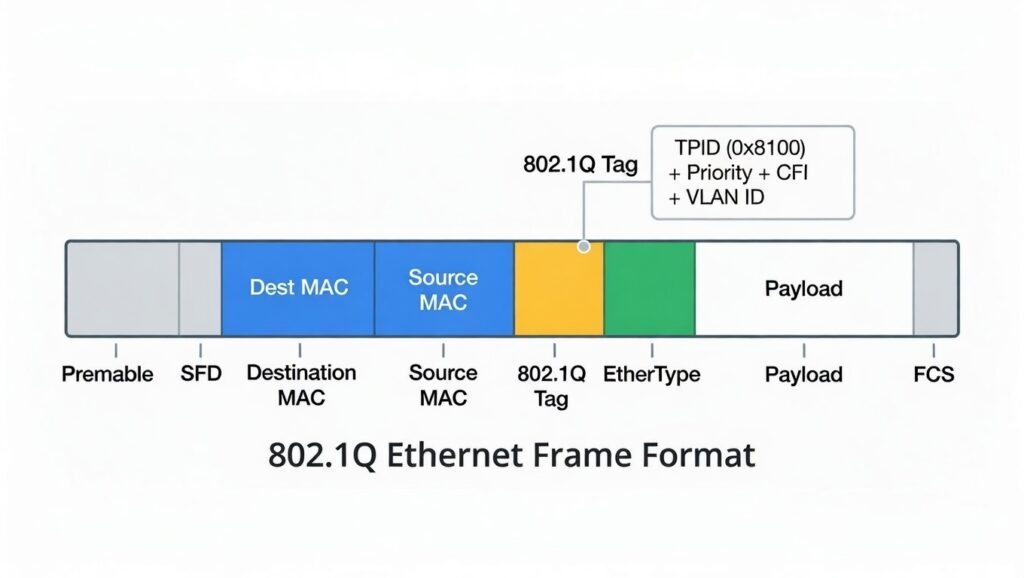
Look at the frame structure diagram. A normal Ethernet frame has these parts in order:
- Preamble
- Destination MAC
- Source MAC
- Type/Length
- Data
- CRC
When 802.1Q is used on a trunk, a 4-byte tag is inserted right after the Source MAC address and before the original Type/Length field.
The tag contains four important pieces:
- Ethertype = 0x8100 This value tells the receiving device that a VLAN tag is present.
- Priority (3 bits) Used for QoS to mark the importance of the traffic.
- CFI (1 bit) Canonical Format Indicator—almost always 0 in modern Ethernet networks.
- VLAN Identifier (12 bits) The actual VLAN number (1–4094). This is the field that keeps VLANs logically separated.
This small addition increases the frame size by 4 bytes, but modern switches handle it without issue.
Topology
Now look at the topology diagram .
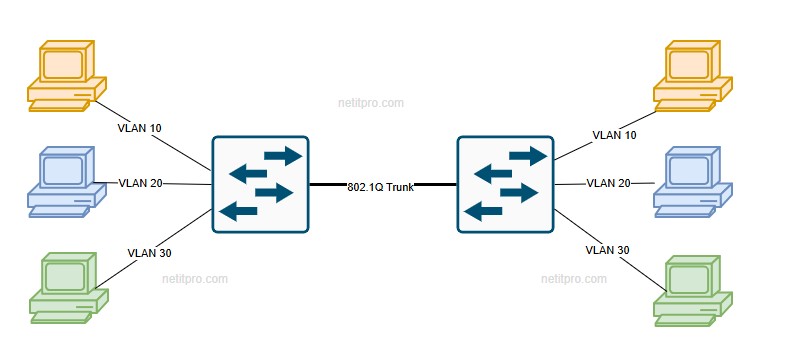
Two switches are connected by one link labeled “Trunk 802.1Q.”
On each switch, you see hosts assigned to VLAN 10 (red), VLAN 20 (green), and VLAN 30 (blue). The trunk link carries traffic for all three VLANs at the same time.
Here’s what happens in practice.
A PC in VLAN 10 on the left switch sends a normal (untagged) frame to its default gateway or another host. The left switch receives the frame on an access port assigned to VLAN 10. Before forwarding the frame over the trunk, the switch adds the 802.1Q tag with VLAN ID 10.
The tagged frame travels across the trunk cable.
The right switch receives the frame, reads the VLAN ID in the tag, removes (strips) the tag, and forwards the original untagged frame only to ports that belong to VLAN 10.
The same process repeats for VLAN 20 and VLAN 30. Each VLAN stays isolated even though they share the same physical link. This is called trunking. It saves ports and cables while preserving VLAN separation, broadcast domains, and security boundaries.
From a protocol view, 802.1Q is stateless and connectionless. There are no handshakes, sequence numbers, or acknowledgments. Each frame is tagged and untagged independently.
Reliability comes from the existing Ethernet CRC, which now covers the tag as well. If the tag is corrupted, the frame is dropped.
In Cisco environments, you configure trunk ports like this:
interface GigabitEthernet0/1
 switchport mode trunk
 switchport trunk allowed vlan 10,20,30
 switchport trunk native vlan 1
no shutdown- switchport mode trunk — makes the port a trunk port.
- switchport trunk allowed vlan — lists which VLANs are permitted to cross.
- switchport trunk native vlan — defines the VLAN for untagged frames (default is 1).
Always check both ends match. Mismatched native VLANs or allowed lists are common exam troubleshooting points.
Common Misunderstandings
- Many people confuse 802.1Q with ISL. ISL is an old Cisco-proprietary method that encapsulates the entire frame. 802.1Q inserts a tag and is the industry standard today.
- Another mistake is thinking access ports add tags. They do not—access ports send and receive untagged frames. Only trunk ports add and remove tags.
- Finally, remember that the native VLAN carries untagged traffic. Leaving it as VLAN 1 in production is a security risk. Change it and match it on both sides of the trunk.
- Mastering these details will make VLAN and trunk questions much easier on the CCNA exam. Practice the configuration in a lab and verify with show commands—you’ll see the concepts come to life.