
Cisco switches have a built-in ability to negotiate whether a link between two switches should operate as a trunk or a regular access port. This negotiation happens through a Cisco proprietary protocol called the Dynamic Trunking Protocol (DTP). While this sounds convenient — no manual trunk configuration required — it comes with a significant security risk that every network engineer should understand. On a production network, you almost never want switches automatically deciding to form trunks with whatever device is plugged in.
Before going further, if you’re not familiar with how trunks work or how VLAN tagging is done with 802.1Q, it’s worth reviewing that foundation first. “VLAN Trunking Protocol“.
Key Takeaways
Before diving into the configuration, here are the most important things to understand about DTP:
- DTP is enabled by default on Cisco switches, typically in dynamic auto or dynamic desirable mode depending on the switch model and IOS version.
- Setting an interface to access mode automatically disables DTP negotiation on that port.
- Setting an interface to trunk mode does not disable DTP — the switch will still send DTP frames unless you explicitly stop it.
- To fully disable DTP on a trunk port, you must use the
switchport nonegotiatecommand. - DTP is a known attack vector for VLAN hopping. Disabling it is considered a security best practice on all production networks.
Prerequisites
To follow along comfortably, you should already understand what VLANs are and why trunk links are needed between switches. You should also be familiar with how to manually configure a trunk port on a Cisco Catalyst switch. ( “Configure trunk ports on cisco switches“)
Configuration
The examples below use two Cisco Catalyst 3560 switches connected together — SW1 and SW2 — with no configuration applied to the interconnect interface yet.
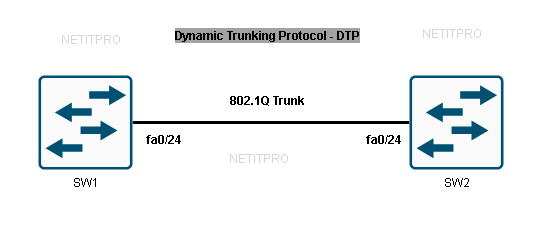
Default DTP Behavior
Let’s first check what the default switchport settings look like on both switches before touching any configuration:
SW1# show interfaces fa0/24 switchport
Name: Fa0/24
Switchport: Enabled
Administrative Mode: dynamic auto
Operational Mode: static access
Administrative Trunking Encapsulation: negotiate
Operational Trunking Encapsulation: native
Negotiation of Trunking: On
SW2# show interfaces fastEthernet 0/24 switchport
Name: Fa0/24
Switchport: Enabled
Administrative Mode: dynamic auto
Operational Mode: static access
Administrative Trunking Encapsulation: negotiate
Operational Trunking Encapsulation: native
Negotiation of Trunking: On
A few things to observe here. The Administrative Mode is dynamic auto — this is the factory default on Cisco Catalyst 3560 switches. However, the Operational Mode shows static access, meaning the port is actually functioning as an access port right now. That happens because when both sides are set to dynamic auto, neither side actively tries to form a trunk. They’re both waiting for the other side to initiate, so the result is an access port.
The Negotiation of Trunking field is set to On, which confirms that DTP frames are being sent out of this interface. This is the behavior you want to change.
DTP Mode Combinations
The final operational state of a link depends entirely on the combination of DTP modes configured on both ends. Here’s how they interact:
| SW1 Mode | SW2 Mode | Result |
|---|---|---|
| Dynamic Auto | Dynamic Auto | Access |
| Dynamic Auto | Dynamic Desirable | Trunk |
| Dynamic Desirable | Dynamic Desirable | Trunk |
| Trunk | Dynamic Auto | Trunk |
| Trunk | Dynamic Desirable | Trunk |
| Access | Any | Access |
The key takeaway here is that dynamic desirable actively sends DTP frames trying to form a trunk, while dynamic auto only responds to DTP frames but does not initiate. This is why two auto ports result in an access link — nobody is initiating the negotiation.
Disabling DTP: Method 1 — Setting the Port to Access Mode
The simplest way to stop DTP on a port is to configure it as a static access port. This is appropriate for ports connected to end devices like PCs, printers, or IP phones.
SW1(config)# interface fastEthernet 0/24
SW1(config-if)# switchport mode access
SW2(config)# interface fastEthernet 0/24
SW2(config-if)# switchport mode access
Now verify the result:
SW1# show interfaces fastEthernet 0/24 switchport
Name: Fa0/24
Switchport: Enabled
Administrative Mode: static access
Operational Mode: static access
Administrative Trunking Encapsulation: negotiate
Operational Trunking Encapsulation: native
Negotiation of Trunking: Off
Notice that Negotiation of Trunking is now Off. As soon as you explicitly define the port as an access port, the switch stops sending DTP frames entirely. This is the behavior you want for any port that faces an end device.
(“Introduction to Internet Protocol (IP) Version 4“) — Understanding what traffic these access ports carry at Layer 3 helps connect the switching and routing layers conceptually.
Disabling DTP: Method 2 — Using switchport nonegotiate on a Trunk Port
Now here’s where many students get tripped up. If you manually configure a port as a trunk, you might assume DTP is disabled — but it isn’t. The switch will still send DTP frames, even though the port is already operating as a trunk. This is both unnecessary and a potential security exposure.
To demonstrate, first configure both interfaces as trunks:
SW1(config)# interface fastEthernet 0/24
SW1(config-if)# switchport mode trunk
SW2(config)# interface fastEthernet 0/24
SW2(config-if)# switchport mode trunk
Verify the switchport details:
SW1# show interfaces fastEthernet 0/24 switchport
Name: Fa0/24
Switchport: Enabled
Administrative Mode: trunk
Operational Mode: trunk
Administrative Trunking Encapsulation: dot1q
Operational Trunking Encapsulation: dot1q
Negotiation of Trunking: On
The trunk is working — Operational Mode: trunk confirms that — but Negotiation of Trunking is still On. The switch is still advertising itself via DTP. To stop this completely, add the nonegotiate command:
SW1(config)# interface fastEthernet 0/24
SW1(config-if)# switchport nonegotiate
SW2(config)# interface fastEthernet 0/24
SW2(config-if)# switchport nonegotiate
Check again:
SW1# show interfaces fastEthernet 0/24 switchport
Name: Fa0/24
Switchport: Enabled
Administrative Mode: trunk
Operational Mode: trunk
Administrative Trunking Encapsulation: dot1q
Operational Trunking Encapsulation: dot1q
Negotiation of Trunking: Off
Now Negotiation of Trunking shows Off. The trunk is still fully operational — it’s just no longer advertising itself via DTP. This is exactly the configuration you want on switch-to-switch uplinks in a production environment.
Worth noting: you cannot use switchport nonegotiate on a port that is still in dynamic auto or dynamic desirable mode. The switch requires the port to already be set to a static mode (either access or trunk) before allowing you to add nonegotiate. This makes sense — if you’re going to stop negotiating, the switch needs to know what mode to lock into.
Why DTP Is a Security Risk
DTP becomes dangerous when an attacker connects a rogue switch or a specially crafted device to an open switch port and sends DTP frames to initiate trunk negotiation. If the port is still in dynamic auto or dynamic desirable mode, the switch may agree to form a trunk. Once that trunk is up, the attacker gains access to traffic from every VLAN crossing that link — a technique known as a VLAN hopping attack.
This is why disabling DTP on all user-facing ports (by setting them to static access) and on all uplink trunk ports (by using switchport nonegotiate) is standard practice in network hardening checklists.
If you’re building out a multi-switch environment where VLANs are being propagated automatically, understanding how VTP interacts with trunk links is also essential. “VLAN Trunking Protocol” Managing which VLANs are allowed on a trunk, and how that information is distributed, becomes critical once you have more than two switches. “Understanding the IPv4 Packet Header” helps contextualize what Layer 3 information is being carried inside the tagged VLAN frames traversing these trunks.
Summary
DTP is a Cisco-proprietary protocol that automates trunk negotiation between switches. It’s enabled by default and operates in one of two dynamic modes: dynamic auto (passive, responds to DTP but doesn’t initiate) and dynamic desirable (active, initiates trunk formation). The resulting link state — trunk or access — depends on the combination of modes on both ends of the link.
There are two ways to disable DTP: configuring the port as a static access port (which turns off DTP completely and is appropriate for end-device ports), or configuring the port as a static trunk and then adding switchport nonegotiate (which keeps the trunk active but stops DTP advertisements). Simply configuring a port as a trunk without nonegotiate is not enough — DTP frames will still be sent.
On any production network, disabling DTP on every port is a security requirement, not an optional step.