
Introduction
In the world of computer networking, the Internet Protocol (IP) is the backbone that enables devices to communicate across the globe. Specifically, IPv4, or Internet Protocol version 4, has been the standard for decades, handling the routing of data packets from source to destination. At the heart of every IPv4 packet lies the header—a compact section packed with essential information that guides the packet through networks.
This article breaks down the IPv4 packet header in a straightforward way, ideal for CCNA learners preparing for the Cisco Certified Network Associate exam. We’ll explore each field, why it matters, and how it fits into broader networking concepts like IP addressing and packet forwarding. By the end, you’ll have a solid grasp of how these headers ensure reliable data delivery, even in complex scenarios involving fragmentation or quality of service (QoS). Whether you’re troubleshooting connectivity issues or studying for CCNA 200-301, understanding IPv4 packet structure is key to mastering Internet Protocol basics.
What Is the IPv4 Packet Header?
The IPv4 packet header is like an envelope’s address label—it contains all the details routers need to deliver the data inside. Typically 20 bytes long (but up to 60 bytes with options), it sits at the front of every IPv4 packet. This header includes mandatory fields that describe the packet’s origin, destination, size, and handling instructions.
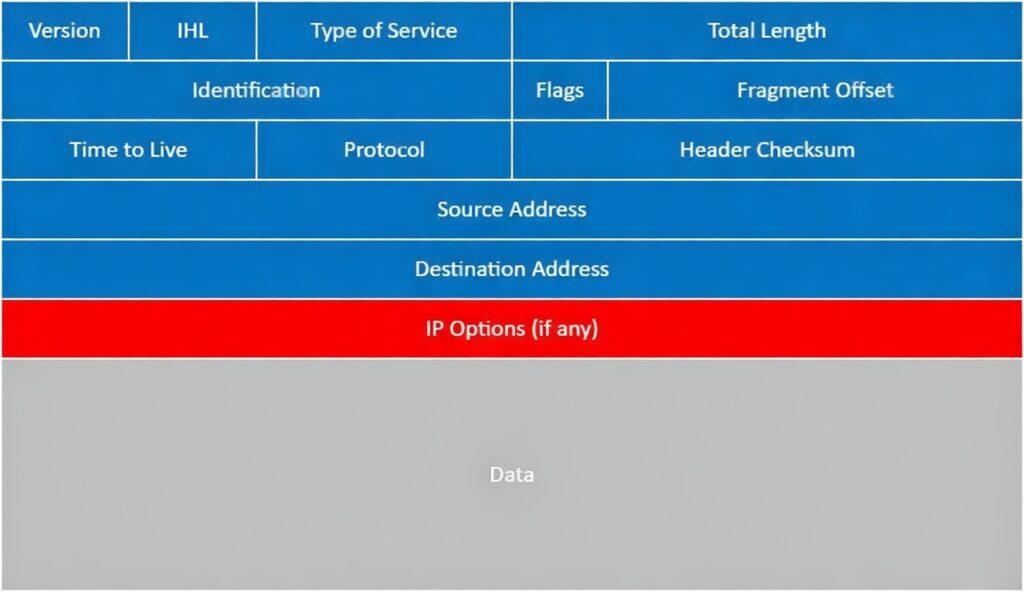
Knowing the header helps with real-world tasks, such as diagnosing why packets get dropped, setting up QoS for prioritizing traffic, or understanding why IPv4 is evolving toward IPv6 for better scalability. Unlike stateful protocols like TCP, IPv4 treats each packet independently, making the header crucial for standalone routing decisions.
Imagine sending a letter: The header is the “to” and “from” addresses, postage details, and any special handling notes. In networking, routers read this header to forward packets efficiently across the internet.
Visualizing the Header Structure
To make it easier, picture the IPv4 header as a table of fields arranged in rows of 32 bits (4 bytes) each. The basic header spans five rows (20 bytes), with optional fields adding more.
- Row 1: Version, Header Length, Type of Service, Total Length
- Row 2: Identification, Flags, Fragment Offset
- Row 3: Time to Live, Protocol, Header Checksum
- Row 4: Source Address
- Row 5: Destination Address
- Additional Rows (if needed): Options and Padding
This layout ensures routers can quickly parse the information. For a hands-on view, tools like Wireshark can capture and display these fields in real packets.
Breaking Down the Header Fields
Let’s dive into each field of the IPv4 packet header. We’ll explain them in order, using simple language and examples to connect them to everyday networking scenarios.
Version
This 4-bit field kicks off the header by identifying the IP version. For IPv4, it’s always set to 4. Think of it as a quick check: If a router sees anything else, it knows the packet isn’t standard IPv4. This is especially useful in mixed environments transitioning to IPv6, where headers differ entirely.
Example: In a lab setup, if you accidentally send an IPv6 packet to an IPv4-only device, the version mismatch triggers an error, preventing confusion.
Internet Header Length (IHL)
Next is the 4-bit IHL field, which tells how long the header is in 32-bit words (multiples of 4 bytes). The smallest value is 5 (20 bytes, no options), and the largest is 15 (60 bytes). Without this, routers wouldn’t know where the header ends and the actual data begins.
In simple terms, it’s like knowing the length of an email’s subject line so you can jump straight to the body. This flexibility allows for optional features but keeps most packets lean for efficiency.
Type of Service (ToS) or Differentiated Services
This 8-bit field helps with Quality of Service (QoS) in IP networks. It signals how the packet should be treated—perhaps prioritizing voice calls over email traffic. Originally called Type of Service, it’s now often used for Differentiated Services Code Point (DSCP) in the first 6 bits, with the last 2 for Explicit Congestion Notification (ECN) to manage network traffic without dropping packets.
For CCNA students, remember: Higher DSCP values mean higher priority. ECN lets devices signal congestion early, like a “slow down” sign on a busy highway.
Example: In a video conference, setting a high DSCP ensures smooth streaming, even if the network is crowded with file downloads.
Total Length
A 16-bit field that specifies the entire packet’s size in bytes, including header and data. It ranges from 20 bytes (just the header) to 65,535 bytes (the max for 16 bits).
This helps routers verify if the packet arrived intact and decide on fragmentation if it’s too big for a link. In IP addressing, knowing the total length prevents buffer overflows.
Identification
This 16-bit number uniquely tags a packet for fragmentation purposes. All pieces of a split packet share the same ID, allowing the receiver to reassemble them.
It’s like labeling boxes from the same shipment. Operating systems generate this value differently, but it’s random enough to avoid collisions in busy networks.
Flags
Three bits here control fragmentation behavior:
- Bit 0: Reserved (always 0).
- Bit 1: Don’t Fragment (DF)—If set, routers can’t break the packet; they drop it if it’s too large and send an error.
- Bit 2: More Fragments (MF)—Indicates if more pieces follow; unset on the last fragment.
These flags are vital for Path MTU Discovery (PMTUD), where devices test the maximum packet size without fragmentation.
Example: Streaming services often set DF to avoid reassembly overhead, relying on PMTUD to adjust sizes dynamically.
Fragment Offset
A 13-bit field showing where this fragment fits in the original packet, measured in 8-byte units. The first fragment has offset 0; others build from there.
This ensures correct reassembly, like puzzle pieces numbered by position. Max offset is 8,191, covering up to 65,528 bytes—close to the total length limit.
Time to Live (TTL)
An 8-bit counter that decreases by 1 at each router hop. If it hits 0, the packet is discarded to prevent infinite loops.
TTL is a safety net in IP routing. Tools like traceroute exploit it by sending packets with low TTLs to map paths.
Example: A default TTL of 64 on Linux means the packet can survive 64 hops; beyond that, it’s dropped, protecting against routing errors.
Protocol
This 8-bit field identifies the upper-layer protocol in the payload, such as:
- 1 for ICMP (used in ping)
- 6 for TCP (reliable connections)
- 17 for UDP (fast, unreliable)
It tells the receiver how to handle the data, bridging network and transport layers in the OSI model.
Header Checksum
A 16-bit value that verifies the header’s integrity. It’s calculated over the header fields (excluding data) and recalculated at each hop since TTL changes.
Like a parity check in data transmission, it catches errors from noise or corruption. If mismatched, the packet is dropped.
Source Address
The 32-bit IPv4 address of the sender. This is how replies know where to go back.
In IP addressing basics, it’s usually unchanged unless Network Address Translation (NAT) is involved.
Destination Address
The 32-bit IPv4 address of the intended receiver. Routers use this for forwarding decisions based on routing tables.
Options
This variable section (0-40 bytes) adds extras like timestamps or specific routes. It’s padded to end on a 32-bit boundary, and IHL accounts for it.
Options are rare due to security risks—they can reveal network topology—and processing overhead. Many firewalls block them.
Example: Loose Source Routing lets you suggest a path, but it’s often disabled to prevent attacks.
Example: Analyzing a Real IPv4 Packet
To see the header in action, let’s look at a sample captured with Wireshark, a free packet analyzer tool popular among CCNA students.
Suppose we have an ICMP echo request (ping) packet:
- Version: 4
- Header Length: 20 bytes (IHL=5)
- Differentiated Services: 0x00 (default priority, no ECN)
- Total Length: 100 bytes
- Identification: 0x0000
- Flags: 0x0 (no DF or MF)
- Fragment Offset: 0
- TTL: 255
- Protocol: 1 (ICMP)
- Header Checksum: 0x2245
- Source Address: 192.168.12.1
- Destination Address: 192.168.12.2
This packet is a simple ping from one router to another. In Wireshark, fields are shown in big-endian order (most significant byte first) for consistency across devices.
Table: Common Protocol Numbers
| Protocol Number | Description | Example Use |
|---|---|---|
| 1 | ICMP | Ping, error messages |
| 6 | TCP | Web browsing, email |
| 17 | UDP | Streaming, DNS |
Key Takeaways
- The IPv4 header is 20-60 bytes, containing essential fields for routing and handling packets in Internet Protocol networks.
- Mandatory fields like Version, IHL, and Addresses ensure basic functionality, while others like ToS and Flags add QoS and fragmentation control.
- IPv4 packets are stateless, relying on higher layers for connections—key for understanding IP vs. TCP/UDP.
- Tools like Wireshark reveal headers in real traffic, aiding CCNA troubleshooting.
- Transitioning to IPv6? Note its fixed 40-byte header avoids IHL variability for better efficiency.
Example Scenarios
- Fragmentation in Action: A large file transfer over Ethernet (MTU 1500 bytes) exceeds the limit. The sender sets Identification to 1234, DF=0. Routers fragment it: First piece (offset 0, MF=1), middle (offset 185, MF=1), last (offset 370, MF=0). Receiver reassembles using ID and offsets.
- QoS for VoIP: In a corporate network, voice packets get DSCP 46 (high priority). Routers queue them ahead of data traffic, reducing latency during calls.
- TTL in Troubleshooting: Using traceroute, start with TTL=1 (drops at first router), increment to map the path to a website, revealing hops and potential bottlenecks.
- NAT and Addresses: A home device (private IP 192.168.1.10) sends to the internet. The router changes Source Address to its public IP via NAT, allowing replies to route back correctly.
Practice Questions
Test your knowledge with these CCNA-style questions:
- What is the purpose of the TTL field in an IPv4 header? a) To identify the upper-layer protocol b) To prevent routing loops by decrementing at each hop c) To specify packet priority for QoS d) To indicate fragment positionAnswer: b) To prevent routing loops by decrementing at each hop
- If the IHL value is 6, what is the header length? a) 20 bytes b) 24 bytes c) 40 bytes d) 60 bytesAnswer: b) 24 bytes (6 x 4 bytes)
- Which flag prevents a packet from being fragmented? a) MF (More Fragments) b) DF (Don’t Fragment) c) Reserved bit d) Fragment OffsetAnswer: b) DF (Don’t Fragment)
- What does the Protocol field value of 17 represent? a) ICMP b) TCP c) UDP d) IPAnswer: c) UDP
- True or False: The IPv4 header checksum covers both the header and the data payload.Answer: False (It only covers the header)
Conclusion
Mastering the IPv4 packet header is a foundational step in your CCNA journey, unlocking deeper insights into IP addressing, Internet Protocol operations, and network troubleshooting. From fragmentation to QoS, these fields make global connectivity possible, even as we shift toward IPv6 for expanded addressing.
Practice with packet captures and labs to reinforce these concepts. Remember, networking is about building reliable paths for data—start with the header, and the rest follows. For more on related topics like IP routing or IPv6, explore additional resources to broaden your skills. Keep learning, and happy networking!