
Best CRM Software for Tech Companies: 2026 Review Guide
Did you know that tech companies using advanced CRM systems can see up to a 29% increase in sales productivity? In a fast-paced industry where customer relationships drive innovation and growth, choosing the right CRM is more than a tool—it’s a strategic edge. As an IT professional, you’re likely juggling complex client needs, integrating with diverse tech stacks, and ensuring seamless collaboration across teams. In this review of the best SaaS tools for customer relationship management in tech, we’ll explore timeless strategies to help you select software that scales with your business, boosts efficiency, and aligns with the latest trends in B2B operations.
Why does this matter for IT pros? Tech companies often deal with high-value, long-term clients who expect personalized service, rapid issue resolution, and data-driven insights. A solid CRM not only centralizes customer data but also integrates with IT productivity apps and even top help desk software, turning potential chaos into streamlined workflows. Whether you’re a startup IT manager or leading a larger team, the right CRM can enhance cybersecurity through secure data handling, automate routine tasks, and provide analytics to inform your next big move.
By the end of this guide, you’ll have in-depth insights into top choices, feature breakdowns, pricing, and comparisons to make an informed decision. Let’s dive in and find the best SaaS for IT managers that fits your tech ecosystem.
Table of Contents
- Introduction
- Salesforce: The Enterprise Powerhouse
- HubSpot CRM: The All-in-One Growth Engine
- Zoho CRM: Customizable and Affordable for Scaling Teams
- Pipedrive: Pipeline-Focused for Sales-Driven Tech Firms
- Freshworks CRM: AI-Powered for Customer-Centric Support
- Zendesk Sell: Seamless Help Desk Integration
- monday.com CRM: Visual Workflow Mastery
- Conclusion
- FAQ
Salesforce: The Enterprise Powerhouse
Salesforce stands out as one of the best SaaS tools for tech companies needing robust scalability and deep integrations. As a cloud-based CRM, it centralizes customer data, automates sales processes, and provides AI-driven insights to predict trends. In my experience, it’s particularly valuable for IT managers handling complex B2B relationships, where customization is key to aligning with unique tech workflows.
Key features include:
- Lead and opportunity management with AI-powered Einstein for predictive scoring.
- Workflow automation and custom dashboards for real-time visibility.
- Extensive integrations with over 7,000 apps, including cybersecurity software like Okta and IT productivity apps such as Slack.
- Advanced reporting and analytics for data-driven decisions.
- Mobile app for on-the-go access, ideal for remote IT teams.
Pricing starts at $25 per user per month for the Starter Suite, scaling up to $500+ for Enterprise plans with advanced features. User ratings average 4.4/5 on G2 from over 20,000 reviews, praised for its customization but noted for a steeper learning curve.
For IT pros, Salesforce fits like a glove in tech environments, offering secure data encryption and compliance tools that double as affordable cybersecurity tools for small teams. It integrates seamlessly with dev ops platforms, helping manage client projects from ideation to deployment.
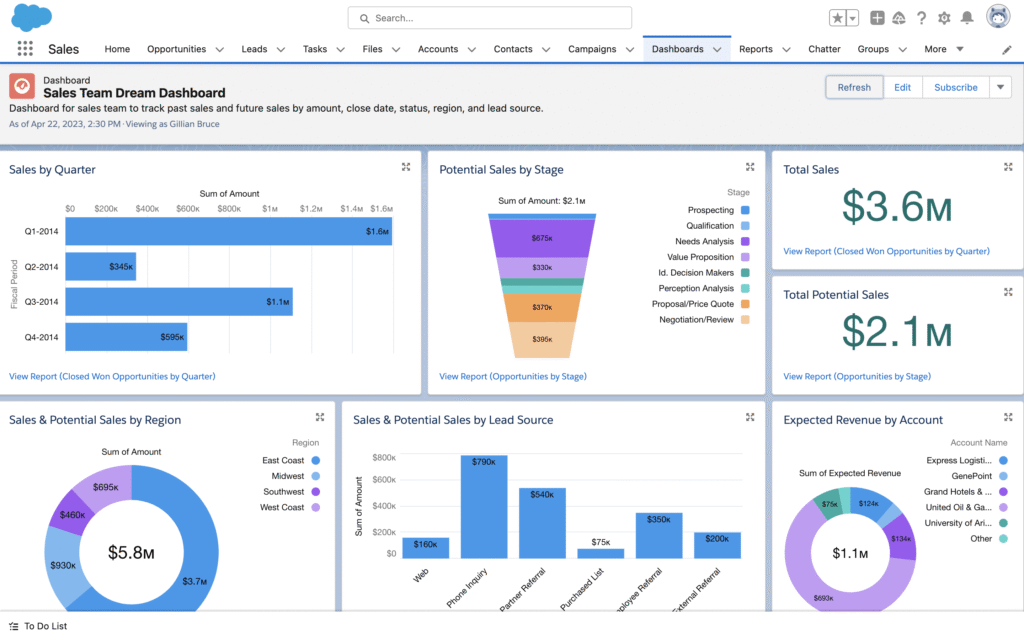
| Pros | Cons |
|---|---|
| Highly scalable for growing tech firms | Higher cost for advanced tiers |
| Vast ecosystem of integrations | Can be overwhelming for beginners |
| Strong AI and analytics capabilities | Requires training for full utilization |
Compared to simpler options like HubSpot, Salesforce excels in enterprise-level B2B software comparisons where depth matters over ease. If you’re ready to level up, try Salesforce free here [affiliate link]. As an affiliate, we may earn from qualifying purchases.
HubSpot CRM: The All-in-One Growth Engine
HubSpot CRM is a top choice for tech companies focused on inbound marketing and sales alignment. This free-core platform evolves into a full suite, making it one of the best SaaS tools for startups and mid-sized firms. It unifies sales, marketing, and service data, helping IT managers track customer journeys without silos.
Key features include:
- Contact management and deal tracking with customizable pipelines.
- Email marketing automation and live chat integration.
- Built-in help desk tools for ticket management, blending CRM with top help desk software.
- Reporting dashboards and AI-powered content suggestions.
- Seamless connections to Google Workspace and Microsoft 365 for IT-heavy workflows.
Pricing: Free for basic CRM; paid plans start at $20 per user per month for Sales Hub. It earns 4.4/5 on Capterra from 13,000+ reviews, lauded for its user-friendliness.
IT pros appreciate HubSpot’s intuitive interface, which reduces onboarding time in fast-moving tech teams. Its security features, like two-factor authentication, make it a solid pick among affordable cybersecurity tools for small teams.
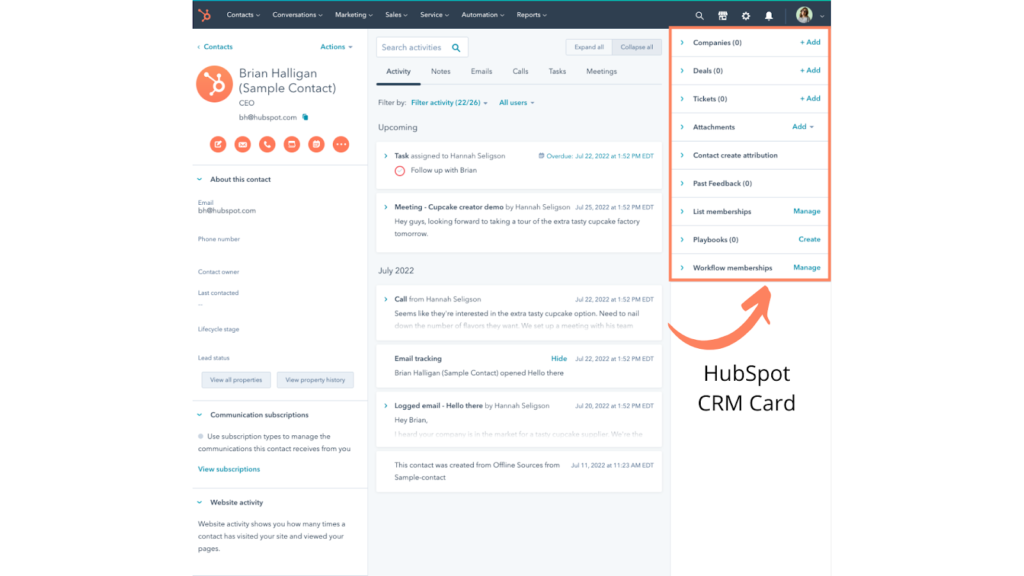
| Pros | Cons |
|---|---|
| Free entry-level plan | Advanced features require upgrades |
| Excellent marketing integrations | Limited customization in free tier |
| Easy to use for non-technical users | Can get pricey for large teams |
In B2B software comparisons, HubSpot shines against Zoho for its marketing focus, ideal if your tech company relies on content-driven leads. What do you think—does inbound marketing fit your strategy? Leave a comment below! For a hands-on trial, check out HubSpot here [affiliate link]. As an affiliate, we may earn from qualifying purchases.
Zoho CRM: Customizable and Affordable for Scaling Teams
Zoho CRM offers a versatile, AI-powered platform that’s among the best SaaS for IT managers looking for value without complexity. It supports multichannel engagement, making it perfect for tech companies managing diverse client interactions.
Key features:
- Omnichannel support with email, phone, and social integration.
- AI assistant (Zia) for lead prediction and automation.
- Custom modules and workflows tailored to tech processes.
- Integration with over 500 apps, including IT productivity apps like Jira.
- Analytics and forecasting for strategic planning.
Pricing begins at $14 per user per month, with a free tier available. Ratings: 4.3/5 on G2, with users highlighting affordability.
For IT pros, Zoho’s flexibility allows seamless integration with dev tools and cybersecurity software reviews often praise its data protection. It’s great for small teams scaling up.
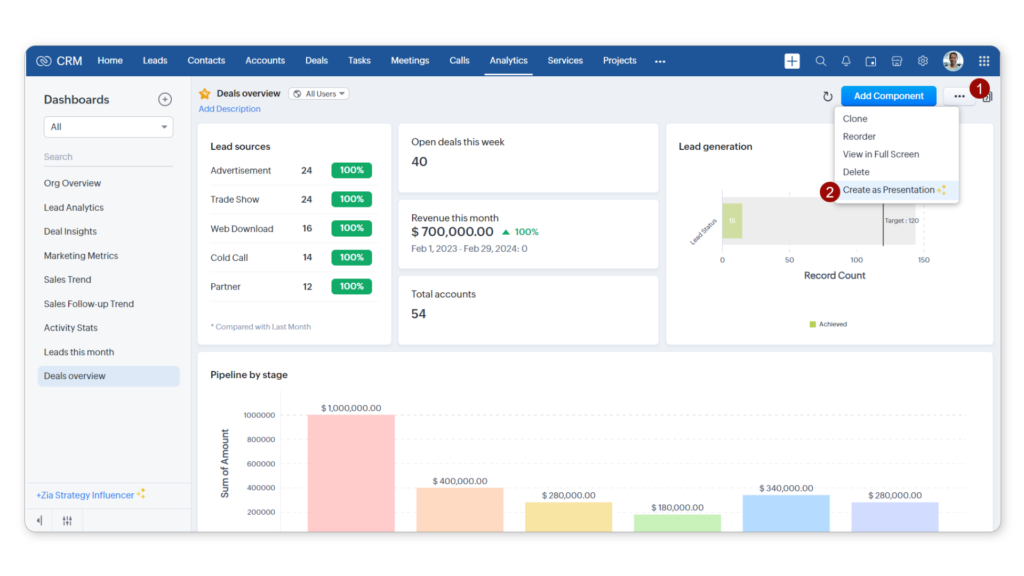
| Pros | Cons |
|---|---|
| Highly affordable | Interface can feel dated |
| Strong customization | Slower support response |
| AI features at low cost | Limited in very large enterprises |
Versus Salesforce, Zoho wins in B2B software comparisons for budget-conscious tech firms. Ready to customize? Try Zoho free [affiliate link]. As an affiliate, we may earn from qualifying purchases.
Pipedrive: Pipeline-Focused for Sales-Driven Tech Firms
Pipedrive emphasizes visual sales pipelines, making it a standout in B2B software comparisons for tech sales teams. It’s straightforward yet powerful for managing deals in competitive markets.
Key features:
- Drag-and-drop pipeline management.
- Activity reminders and goal tracking.
- Email integration and automation.
- Mobile app with offline access.
- Analytics for performance insights.
Pricing: From $14 per user per month. Ratings: 4.5/5 on Capterra.
IT pros value its simplicity for quick adoption in agile teams, with integrations to top help desk software like Zendesk.
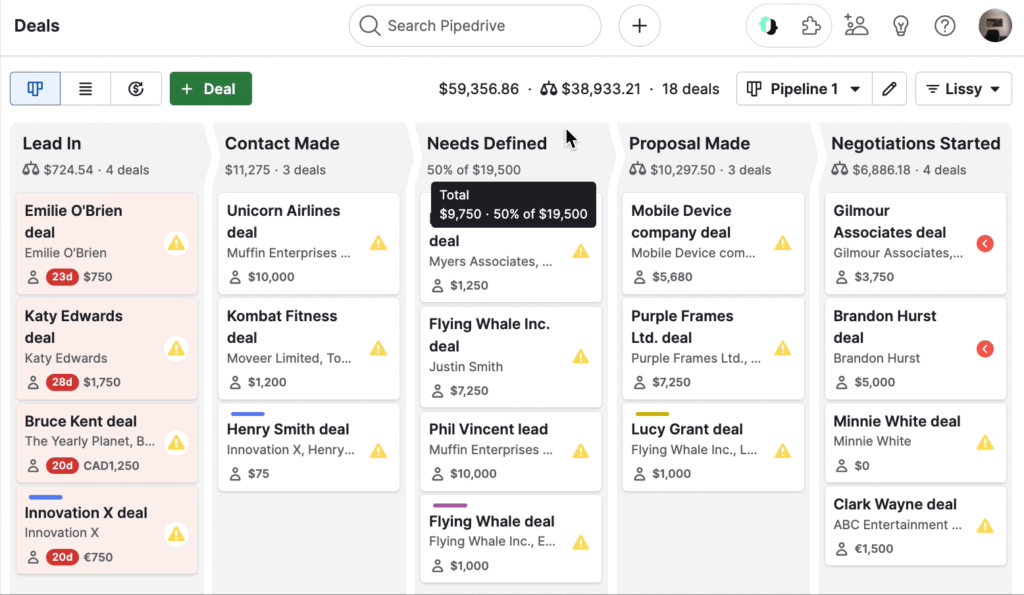
| Pros | Cons |
|---|---|
| Intuitive interface | Less marketing focus |
| Strong sales tools | Basic reporting in entry plans |
| Affordable scaling | Fewer advanced AI features |
Compared to HubSpot, it’s more sales-centric. Explore Pipedrive [affiliate link]. As an affiliate, we may earn from qualifying purchases.
Freshworks CRM: AI-Powered for Customer-Centric Support
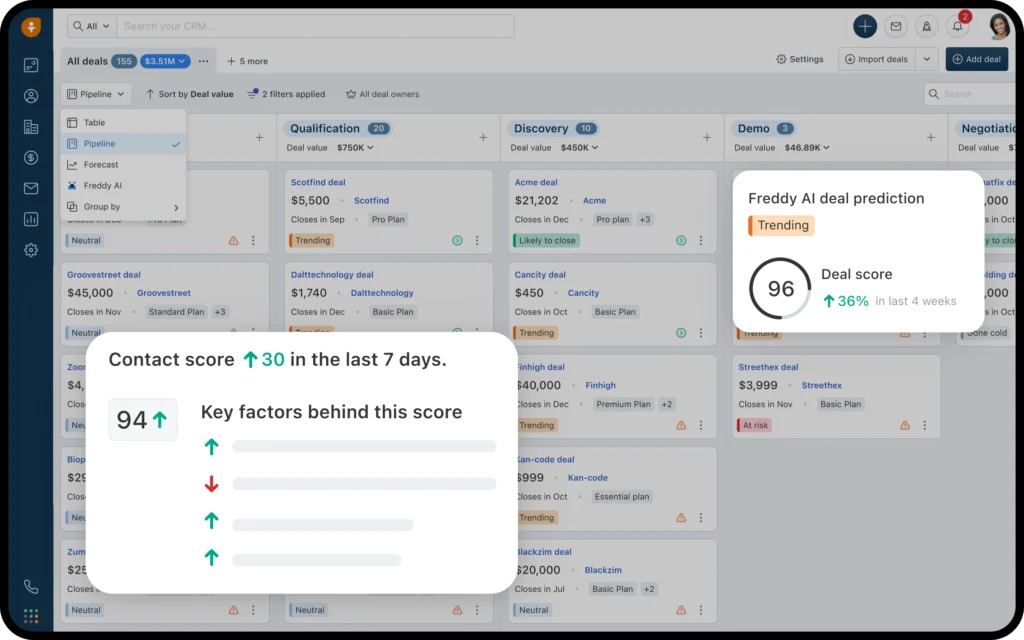
Freshworks (Freshsales) blends CRM with support features, ideal for tech companies prioritizing customer success. It’s one of the best SaaS tools with built-in AI for personalization.
Key features:
- Freddy AI for lead scoring and chatbots.
- Built-in phone and email tools.
- Workflow automation.
- Integration with top help desk software like Freshdesk.
- Predictive contact scoring.
Pricing: Free tier; paid from $19 per user per month. Ratings: 4.5/5 on G2.
Suits IT pros with its help desk ties, enhancing cybersecurity software reviews through secure interactions.
| Pros | Cons |
|---|---|
| AI-driven insights | Limited custom fields in basic plans |
| Strong support integration | Newer to market |
| User-friendly | Scaling costs add up |
Vs. Zoho, it’s more support-oriented. Try Freshworks [affiliate link]. As an affiliate, we may earn from qualifying purchases.
Zendesk Sell: Seamless Help Desk Integration
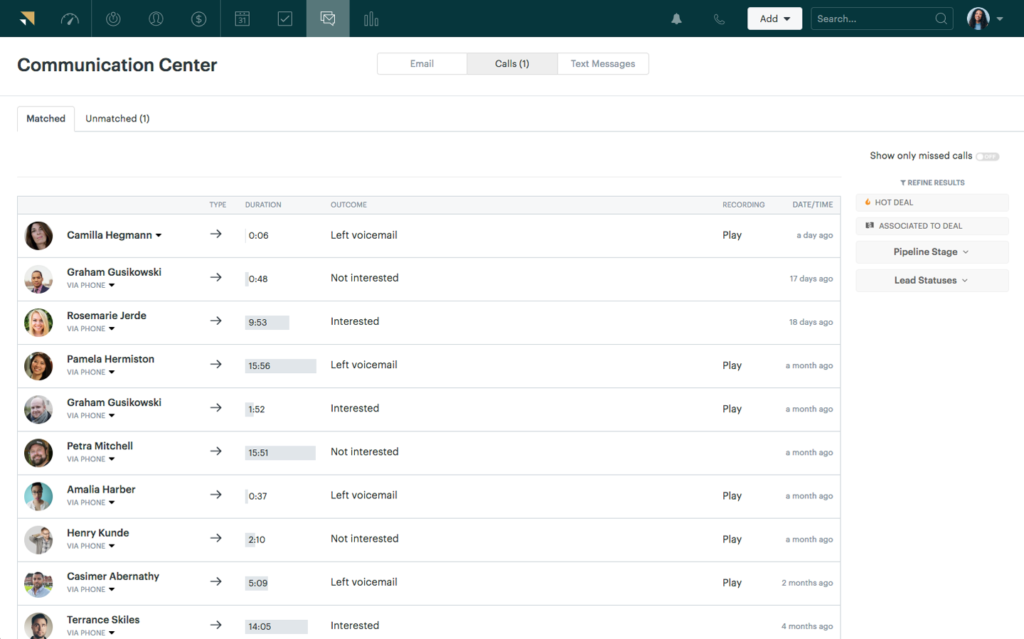
Zendesk Sell focuses on sales with deep ties to support, making it a hybrid in top help desk software and CRM spaces for tech firms.
Key features:
- Pipeline management and forecasting.
- Task automation.
- Integration with Zendesk Support for unified views.
- Mobile selling tools.
- Analytics dashboards.
Pricing: From $19 per user per month. Ratings: 4.3/5 on G2.
Perfect for IT managers needing CRM-help desk synergy, with robust security.
| Pros | Cons |
|---|---|
| Excellent support integration | Less standalone CRM depth |
| Quick setup | Higher pricing for full suite |
| Reliable for B2B | Limited marketing tools |
In comparisons, it edges Freshworks for pure help desk ties.
monday.com CRM: Visual Workflow Mastery
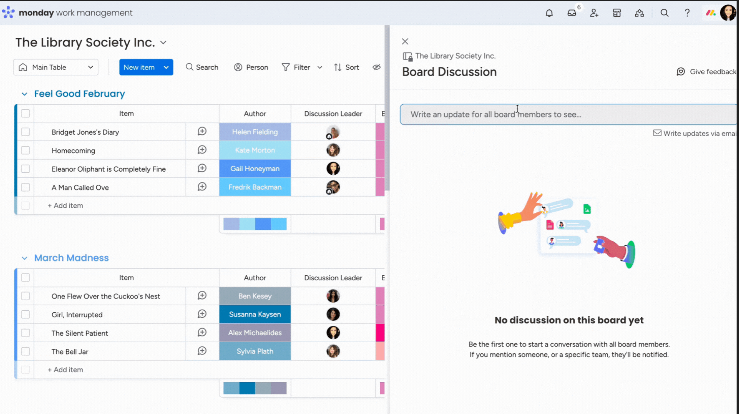
monday.com CRM brings project management flair to CRM, ideal for tech teams blending sales and ops.
Key features:
- Customizable boards for pipelines.
- Automation and integrations.
- Collaboration tools.
- Dashboards for insights.
- App marketplace.
Pricing: From $12 per user per month. Ratings: 4.6/5 on Capterra.
Fits IT pros with visual, flexible workflows.
| Pros | Cons |
|---|---|
| Highly visual | Not purely CRM-focused |
| Great for teams | Learning curve for complexity |
| Scalable | Add-ons needed for depth |
Vs. Pipedrive, it’s more collaborative.
Conclusion
In wrapping up this guide to the best CRM software for tech companies, top picks include Zoho for budget options, Salesforce for enterprises, and HubSpot for growth-focused teams. For small teams, go with HubSpot’s free plan; enterprises, Salesforce’s scalability. In my experience, the key is matching features to your workflow—consider integrations with IT productivity apps and security needs.
What CRM are you using? Share in the comments and let’s discuss! For more, check [Related: Cybersecurity Software Reviews]. Don’t forget to share this post on social media.
FAQ
What is the best free SaaS CRM tool?
HubSpot CRM offers robust free features for basic needs.
How does CRM integrate with help desk software?
Many like Zendesk and Freshworks offer native integrations for unified support.
What’s the best CRM for IT managers in small teams?
Zoho CRM provides affordability and customization.
Are there affordable cybersecurity tools in these CRMs?
Yes, features like encryption in Salesforce and HubSpot enhance security.
Which CRM has the best AI features?
Salesforce’s Einstein and Zoho’s Zia lead in predictive insights.
How do I choose between Salesforce and HubSpot?
Salesforce for depth, HubSpot for ease—test both.
What’s the top help desk software for CRM integration?
Zendesk pairs seamlessly with its Sell CRM.
Is monday.com good for tech project management in CRM?
Absolutely, its boards excel in visual workflows.
Can CRMs help with B2B software comparisons?
Yes, analytics in tools like Pipedrive aid in evaluating deals.
What’s the most scalable CRM for growing tech companies?
Salesforce handles enterprise growth best.